Plex FAQs
Video Settings
To make sure you are getting the best image quality when watching your favourite show
or movie you should periodically check your Plex settings.
Step 1
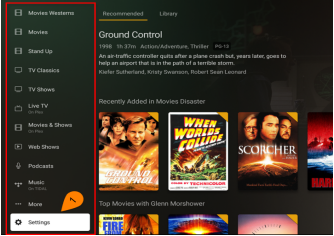
Open the Plex menu
Scroll to the bottom
Select Settings
Step 2
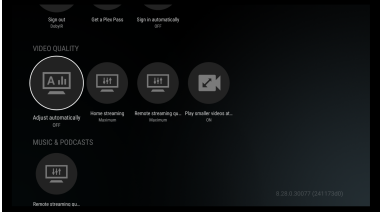
Make sure all your settings
match those shown
Exit and restart the app
How to Make a Request
The great thing about being a Cosy Plex subscriber is the enormous catalog of movies
(over 30,000) and TV shows (over 11,000) which grows daily. Sometimes though there is
that obscure movie that may not be in the catalog.
Cosy Plex subscribers have the advantage of being able to make requests for movies,
TV series and documentaries. Requests are made on our online support server.
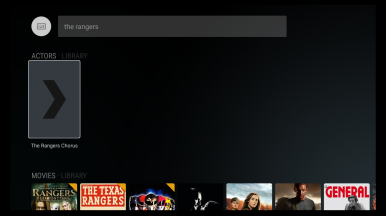
Step 1
Do a search in Plex first
Scroll down to the type of
media you searched for (
Movies, TV Shows) and
scroll thru them to see if
your media is there.
Step 2
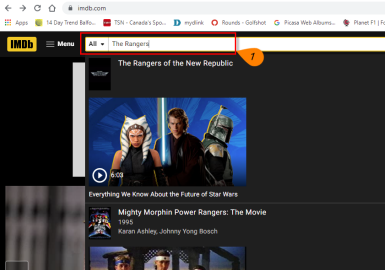
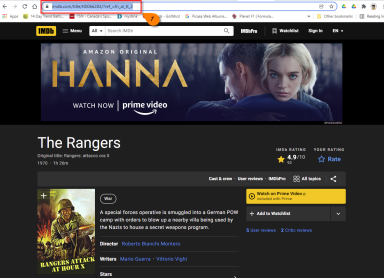
From a web browser open
IMDB.com
In the search bar type in the
name of the movie and press
enter.
Step 3
Copy the url in In the
browser address window
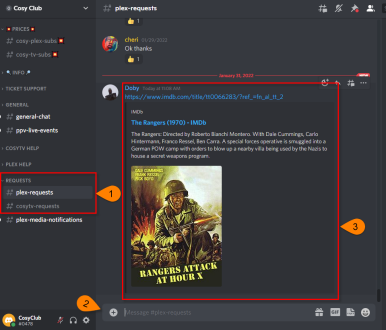
Open the plex-requests
channel on Discord
Paste the url you copied
from IMDB.com
Press enter and wait a few
seconds and the information
is posted
You’ll get a notification if it
can be found and when it
will be loaded
Cosy Tips
Before we go here are a couple of tips
- Video quality settings are important to check periodically. Updates pushed out
from Plex can sometimes change them to default lower quality settings. - Search and Request is one of the things that sets the Cosy Plex service above
others. Make sure to use them.